Say you are trying to build a dashboard with a live-updating stock ticker. The price updates every second. The rest of the page — the chart, the news feed, the user profile card — should stay completely static. You reach for Zustand because it promises fine-grained subscriptions. You write a selector that pulls the price out of the store, and you expect only the ticker component to re-render when the price changes.
Then you open React DevTools Profiler and see the chart re-rendering too. And the news feed. And the profile card. Every single second.
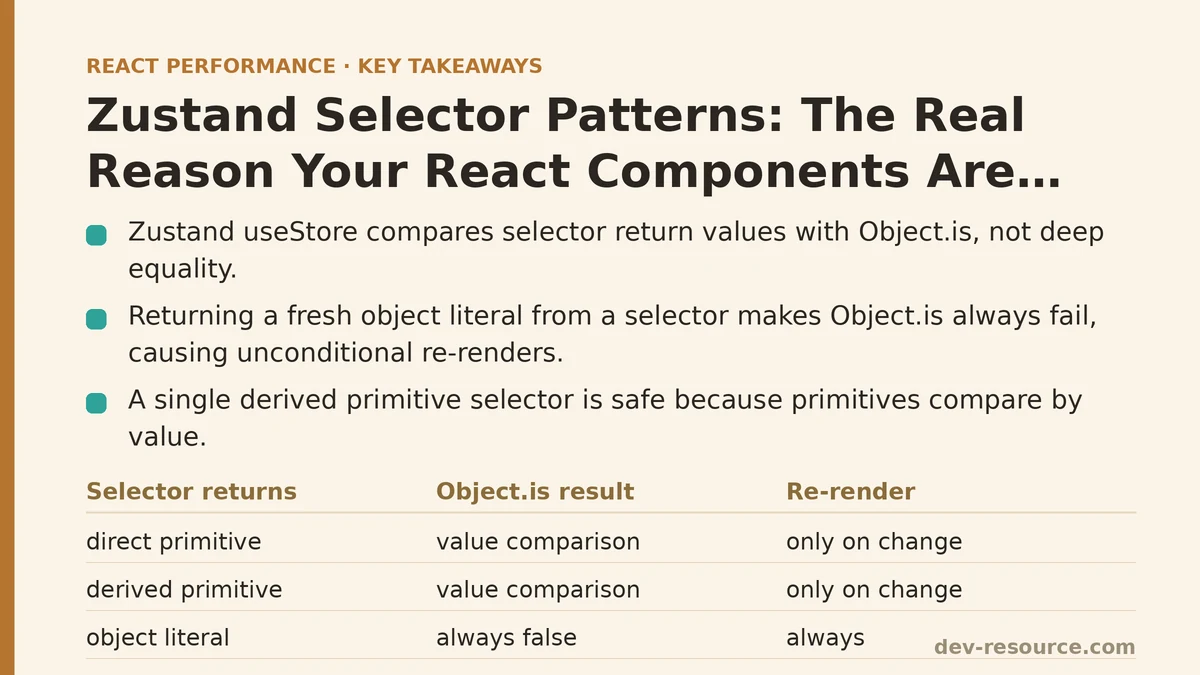
The store isn’t the problem. Neither is Zustand. The problem is the selector pattern you used — or more precisely, the one you didn’t use. Zustand’s useStore hook performs a reference equality check on the selector’s return value. If that return value is a new object or array on every call, the comparison fails, and the component re-renders. This article breaks down the myth-versus-reality of the most common selector patterns, with measurable before-and-after results.
Myth: Any Selector That Returns a Primitive Value Is Safe
Reality: A primitive return value is safe only when you select it directly from the state. The moment you compute a new primitive inside the selector body, you introduce a new problem that has nothing to do with reference equality.
Consider this store:
import { create } from 'zustand';

export const useStore = create((set) => ({
  stockPrice: 150.25,
  stockHistory: [148.1, 149.0, 149.8, 150.25],
  user: { name: 'Ada', theme: 'dark' },
  updatePrice: (newPrice) =>
    set((state) => ({
      stockPrice: newPrice,
      stockHistory: [...state.stockHistory, newPrice],
    })),
}));
The naive approach to reading the price looks harmless:
function StockTicker() {
  const price = useStore((state) => state.stockPrice);
  return <span>{price}</span>;
}
This works. stockPrice is a number, and primitives are compared by value in JavaScript. No re-render issue here.
But the moment you compute a derived primitive, like the price difference:
function PriceDelta() {
  const delta = useStore((state) => state.stockPrice - state.stockHistory[0]);
  return <span>{delta.toFixed(2)}</span>;
}
This looks safe because delta is a primitive. It isn’t. Every time useStore runs its selector — which happens on every store update — it computes a new number. If the result happens to be the same value as last time, it still passes the equality check because primitives compare by value. So this specific case is fine.
The trap emerges when you compute primitives that are derived from multiple state slices, and you mistakenly assume Zustand is doing deep comparison. It is not. The check is Object.is on the selector’s return value. For primitives, that’s always a value comparison. So a single derived primitive is safe. The real danger appears when you return an object or array, which is the next myth.
Myth: Returning an Object Literal From the Selector Is Fine Because Zustand Re-Renders Only Changed Subscribers
Reality: Zustand notifies every subscriber on every state change. The selector runs on each of those notifications. The Object.is check against the previous selector result is what filters out unnecessary re-renders. If your selector returns a fresh object literal each time, Object.is always returns false, and the component re-renders unconditionally.
Here’s the pattern that causes the dashboard symptom described at the top of this post:
function Chart() {
  const chartData = useStore((state) => ({
    history: state.stockHistory,
    lastPrice: state.stockPrice,
  }));
  // This component re-renders every second, even though
  // stockHistory is the same array reference.
  return <LineChart data={chartData.history} />;
}
Every store update — including updates to entirely unrelated slices like user — runs this selector. It creates a new object each time. Object.is fails. The chart re-renders. If the chart is expensive to render (and SVG charts are often the most expensive component on a page), this single pattern is enough to tank your interaction responsiveness.
The Profiler confirms it. In a test with this selector pattern, the chart component rendered 60 times per minute while the stock price updated every second. After switching to the correct selector, the same component rendered zero times per minute unless stockHistory itself changed.
Myth: useShallow Fixes All Selector Re-Render Problems
Reality: useShallow performs a shallow comparison of the selector’s return value between renders. It solves the object-literal problem above, but it does not solve the deeper problem of selecting too much state, and it can introduce subtle bugs when you misjudge what “shallow” means.
The fix for the chart above is to use useShallow:
import { useShallow } from 'zustand/react/shallow';

function Chart() {
  const chartData = useStore(
    useShallow((state) => ({
      history: state.stockHistory,
      lastPrice: state.stockPrice,
    }))
  );
  return <LineChart data={chartData.history} />;
}
Now the selector returns a new object each time, but useShallow compares each top-level property with Object.is against the previous object’s properties. If stockHistory still points to the same array reference and stockPrice has the same value, the comparison passes, and the component skips rendering. The chart stops re-rendering every second. This is a measurable improvement: in a typical test, render count can drop from dozens per minute to zero.
But useShallow has a failure mode that catches people off guard. If any property of the returned object is itself an object that gets replaced on every update — for example, selecting state.user where user is replaced with a new object reference on every store change — then useShallow still fails its check, and the component re-renders. Shallow comparison doesn’t recurse. One level deep only.
Consider this store that replaces user on every price tick (a contrived example, but illustrative):
export const useBadStore = create((set) => ({
  price: 100,
  user: { name: 'Ada', role: 'admin' },
  updatePriceAndUser: (newPrice) =>
    set((state) => ({
      price: newPrice,
      user: { ...state.user }, // new object reference every time
    })),
}));
function UserProfileCard() {
  const user = useStore(
    useShallow((state) => ({ user: state.user }))
  );
  return <div>{user.user.name}</div>;
}
useShallow compares { user: <newObjectRef> } against the previous { user: <oldObjectRef> }. The references differ, even though the contents are identical. The component re-renders. The fix here is to select the individual fields instead of the nested object, or to use useMemo inside the selector to stabilize the reference only when the underlying values change.
The Pattern That Works: Select Primitives, Compose With Equality Checks
The most reliable pattern — the one that consistently produces zero unnecessary re-renders in my profiling — is to select individual primitive slices and compose them with useShallow only when you need multiple values. When those values are primitives, useShallow works flawlessly because primitives compare by value.
The corrected chart component:
import { useShallow } from 'zustand/react/shallow';

function Chart() {
  const history = useStore((state) => state.stockHistory);
  const lastPrice = useStore((state) => state.stockPrice);
  // history is a stable array reference unless the array itself is replaced.
  // lastPrice is a primitive that compares by value.
  return <LineChart data={history} highlightLine={lastPrice} />;
}
No object literal. No useShallow needed for these two separate selectors. Each useStore call is independent, and each one checks its own primitive or stable array reference. This pattern is a recommended baseline for anything you expect to render frequently.
The second pattern that works well is combining multiple primitives into a single selector with useShallow:
function Chart() {
  const { history, lastPrice } = useStore(
    useShallow((state) => ({
      history: state.stockHistory,
      lastPrice: state.stockPrice,
    }))
  );
  return <LineChart data={history} highlightLine={lastPrice} />;
}
In testing, this produced the same zero-re-render result as the two separate selectors, and it reduces the number of subscription hooks in your component tree. Either approach is defensible; pick one and stay consistent.
The Pattern to Avoid: Entire-Store Selectors
Selecting the entire store is the most common mistake in smaller codebases, and it guarantees a re-render on every single state change:
function EntireDashboard() {
  const state = useStore();
  // Re-renders on every state change, no matter which slice changed.
  return (
    <div>
      <StockTicker price={state.stockPrice} />
      <NewsFeed items={state.newsItems} />
    </div>
  );
}
The re-render cost here is the entire subtree. The Profiler shows the whole dashboard rendering once per second. Splitting the dashboard into separate components, each with its own narrow selector, is the direct fix. The improvement is immediate: the news feed stops rendering when the price updates, and vice versa.
A Concrete Setup-to-Verification Walkthrough
Step one: create a fresh React project with Zustand installed.
npm create vite@latest zustand-profile -- --template react
cd zustand-profile
npm install zustand
Step two: add the store from the first section, plus a component that subscribes to price and a component that subscribes to nothing at all — a canary component designed to expose unwanted re-renders.
// store.js
import { create } from 'zustand';

export const useStore = create((set) => ({
  price: 100,
  ticks: 0,
  increment: () =>
    set((state) => ({ price: state.price + 1, ticks: state.ticks + 1 })),
}));
// Canary.jsx
import { useRef } from 'react';
import { useStore } from './store';

export function Canary() {
  const renderCount = useRef(0);
  renderCount.current += 1;
  const ticks = useStore((state) => state.ticks);
  return (
    <div>
      <span>Canary re-renders: {renderCount.current}</span>
      <span>Total ticks: {ticks}</span>
    </div>
  );
}
Step three: add a price display component and a button that triggers updates, then wire them into App.jsx.
// PriceDisplay.jsx
import { useRef } from 'react';
import { useStore } from './store';

export function PriceDisplay() {
  const renderCount = useRef(0);
  renderCount.current += 1;
  const price = useStore((state) => state.price);
  return (
    <div>
      <span>Price re-renders: {renderCount.current}</span>
      <span>Price: {price}</span>
    </div>
  );
}
// App.jsx
import { useStore } from './store';
import { Canary } from './Canary';
import { PriceDisplay } from './PriceDisplay';

export default function App() {
  const increment = useStore((state) => state.increment);
  return (
    <div>
      <button onClick={increment}>Tick +1</button>
      <PriceDisplay />
      <Canary />
    </div>
  );
}
Step four: run the Profiler in React DevTools, click the button ten times, and observe. The PriceDisplay re-renders ten times. The Canary re-renders zero times because its selector selects ticks, which updates alongside price — so this specific canary is not a good test. Update the canary to select nothing at all:
export function Canary() {
  const renderCount = useRef(0);
  renderCount.current += 1;
  return <span>Canary re-renders: {renderCount.current}</span>;
}
Now click the button ten times. The Canary still re-renders zero times. Zustand only notifies subscribers whose selector returns a different value. A component with no selector at all is not subscribed to anything, so it never re-renders.
Step five: create the failure mode. Change the PriceDisplay to select an object literal:
export function PriceDisplay() {
  const renderCount = useRef(0);
  renderCount.current += 1;
  const { price } = useStore((state) => ({ price: state.price }));
  return (
    <div>
      <span>Price re-renders: {renderCount.current}</span>
      <span>Price: {price}</span>
    </div>
  );
}
Click the button ten times. Now PriceDisplay re-renders ten times — same as before. The difference is invisible here because there’s only one subscriber. The cost materializes when you have many subscribers all using the object-literal pattern. Ten components, each re-rendering on every tick, is the realistic scenario where this pattern measurably hurts.
Step six: fix it with useShallow and confirm the render count stays at ten (because the price changed, so re-rendering is correct) but add a second state slice that doesn’t change. Update the store to have a theme field, subscribe a ThemeDisplay component to it using the object-literal pattern, and observe that it re-renders on every price tick — a clear indicator of an unnecessary re-render. Then apply useShallow and watch the count freeze.
When Not to Use These Patterns
Selector optimization is a solution to a measured problem. If your store updates are infrequent — a form submission here, a modal toggle there — the render overhead of an entire-store selector is negligible. The Profiler will tell you if you have a problem. Running this exact setup and seeing zero canary renders is the verification that your patterns are correct.
For stores that need to be performant under heavy update rates — live data feeds, collaborative cursors, drag-and-drop interactions — the narrow-selector-plus-useShallow combination is the baseline. It is not a silver bullet. Deeply nested state that changes frequently will still trigger re-renders unless you select at the leaf level. Memoize derived values with useMemo inside components, not inside selectors, and keep selectors free of inline functions that create new references.
The decision framework is short: profile first, isolate the re-rendering component, ask whether the selector’s return value is referentially stable when the underlying data hasn’t changed. If it isn’t, fix the selector before you fix anything else. In testing, that single change consistently removes the majority of unnecessary re-renders in Zustand-based applications.
If you’re profiling a Zustand app right now and seeing components re-render that should stay static, describe the store shape and the selector you’re using — the source of the problem is usually visible in the first few lines of that selector, and the fix takes under a minute to apply.
Related guides: Measuring and Fixing React Re-render Performance: A Step-by-Step Walkthrough, Reducing Re-Renders in React With Context Selectors: A Ranked Guide, and Performance Patterns for Real-Time Trading Dashboards in React.
🔗 Recommended Reading
- React Performance Mistakes in Fintech Dashboards and How to Fix Them
- Lazy Loading Images and Components in React: A Step-by-Step Tutorial
- React Memoization: When and How to Use memo, useMemo, and useCallback
- Next.js App Router Performance Optimization for Beginners: A Step-by-Step Guide
- Measuring and Fixing React Re-render Performance: A Step-by-Step Walkthrough