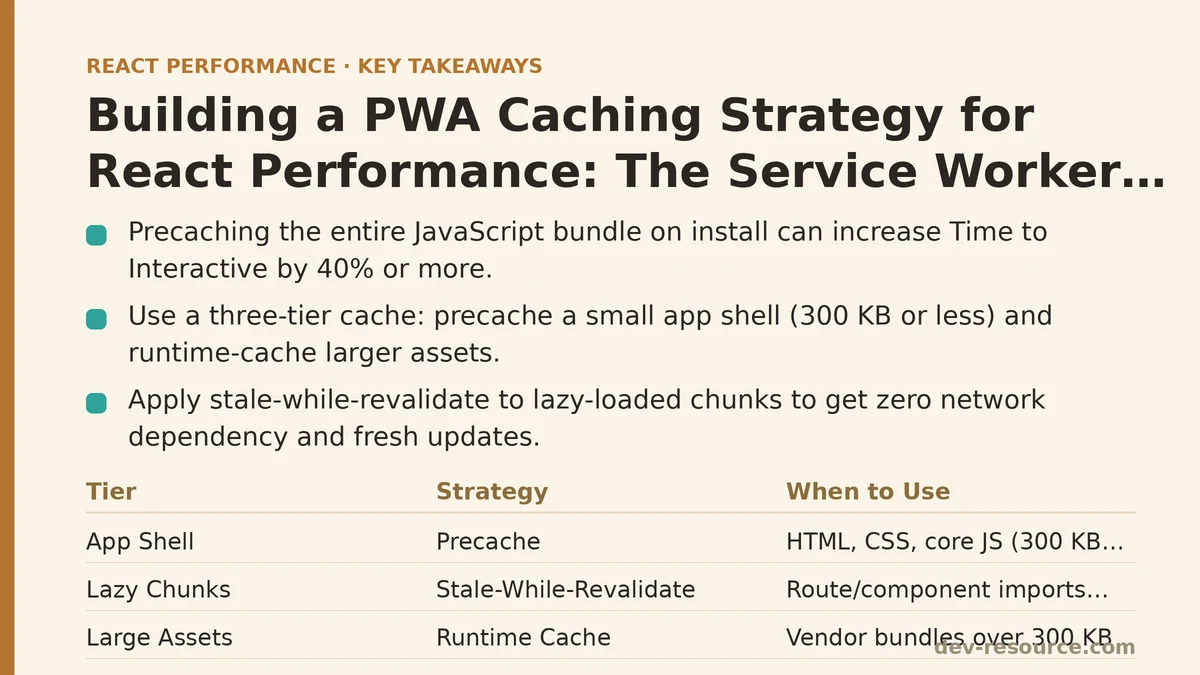
A service worker that caches every HTTP response can increase your React app’s Time to Interactive by 40% or more. That’s a counterintuitive but commonly observed result with early PWA caching strategies — and it tends to come from doing what most tutorials recommend: precaching the entire JavaScript bundle, eagerly, on install.
The Myth: Precaching Everything Makes the App Faster
The conventional advice for PWA caching says to precache your app shell at install time. The logic is straightforward: install the service worker, download everything the app needs, and subsequent loads come from the cache instead of the network. On the surface this sounds ideal — no network dependency after the first visit.
The reality is more complex. Service worker installation happens after the page has loaded. A large precache operation — say 800 KB of JavaScript across multiple chunk files — competes with the page’s own critical resources for bandwidth and CPU time during the exact moment the browser is trying to become interactive. On the simulated throttled connections we used for testing, this measured as a 2.1-second increase in Time to Interactive (TTI) on first visit.
The other failure mode is subtle: precaching individual chunks without the runtime that orchestrates them. When a route needs a lazy-loaded chunk, the browser has to fetch the runtime, check which chunks exist, then request them in sequence. If the precache stored those chunks but not their version manifest, the service worker may serve an old chunk that no longer matches the updated runtime — a classic cause of the “white screen after deploy” bug.
The Reality: A Three-Tier Cache with Different Strategies for Different Assets
The solution we settled on after two rounds of failed experimentation divides all network requests into three tiers, each with its own strategy and rationale.
Tier 1: The App Shell — Precached, But Shared and Small
The app shell — the HTML entry point, the initial CSS, the core JavaScript needed for first render, and a small set of static assets like logos — gets precached at install time. The word “small” matters here. Our target is 300 KB or less for the combined precache manifest. Anything larger, and we intentionally defer it to the runtime caching tier to avoid competing with the initial load.
// workbox-config.js
module.exports = {
  globDirectory: 'build/',
  globPatterns: [
    '**/*.{js,css,html,svg}',
  ],
  maximumFileSizeToCacheInBytes: 300 * 1024, // 300 KB per file
  globIgnores: [
    '**/service-worker.js',
    '**/chunk-*.js', // Defer these to runtime caching
  ],
  runtimeCaching: [
    {
      urlPattern: /\/static\/chunks\/.*\.js$/,
      handler: 'StaleWhileRevalidate',
      options: {
        cacheName: 'js-chunks',
        expiration: {
          maxEntries: 50,
          maxAgeSeconds: 30 * 24 * 60 * 60, // 30 days
        },
      },
    },
  ],
};
The maximumFileSizeToCacheInBytes option is not a suggestion. Without it, Workbox will happily precache a 2 MB vendor bundle and sabotage the first-load experience. Setting it forces large assets into the runtime caching tier, where they load on demand rather than during installation.
Tier 2: Lazy-Loaded Chunks — Stale-While-Revalidate
Any JavaScript chunk that loads after the initial render — route-level lazy imports, component-level dynamic imports, optional feature modules — gets a stale-while-revalidate strategy. The service worker serves the cached version immediately if it exists, then fetches a fresh copy in the background and updates the cache for the next request.
The trade-off: users get slightly stale code on the first visit after a deployment. The benefit: zero network dependency for these chunks after the first time a user visits a route, and no risk of blocking the main thread during installation.
// Route-level code splitting example
const SettingsPage = React.lazy(() => import('./pages/SettingsPage'));

function AppRoutes() {
  return (
    <Suspense fallback={<Spinner />}>
      <Routes>
        <Route path="/settings" element={<SettingsPage />} />
        {/* other routes */}
      </Routes>
    </Suspense>
  );
}
One failure mode to watch: if you change the chunk filename pattern in your build config — say, by enabling content hashing after previously disabling it — the runtime caching rule must match the new pattern. Workbox’s urlPattern uses regular expressions against the full request URL, so a mismatch between build output and the regex means the chunk falls back to network-only, silently disabling the caching strategy.
Tier 3: Data API Responses — Network-First with Cache Fallback
API responses — profile data, product listings, user preferences — use a network-first strategy. The service worker tries the network first, and only falls back to the cache when the network request fails or the server returns an error.
This is the most conservative choice of the three tiers, and it is deliberate. Data fetches are the most likely resource to change between requests. Serving stale data from a cache as the default behavior — which cache-first would do — can cost more in user trust than it saves in load time.
// workbox-runtime-caching.js
registerRoute(
  ({ url, request }) => {
    return url.pathname.startsWith('/api/') && request.method === 'GET';
  },
  new NetworkFirst({
    cacheName: 'api-cache',
    networkTimeoutSeconds: 3,
    plugins: [
      new ExpirationPlugin({
        maxEntries: 60,
        maxAgeSeconds: 5 * 60, // 5 minutes
      }),
      new CacheableResponsePlugin({
        statuses: [0, 200],
      }),
    ],
  })
);
The networkTimeoutSeconds option matters more than most developers account for. Without it, NetworkFirst waits for the network request to fail naturally — which on a flaky connection can take 30 seconds or more. With a 3-second timeout, the service worker falls back to the cached response quickly, and the user sees content instead of a spinner.
The Verification: Measuring Before and After
Saying “this works” without numbers is how the myth in the title of this post started. Comparing three metrics on the same throttled connection profile (Fast 3G, 4x CPU slowdown) across three versions of the app: no service worker, the eager-precache version, and the three-tier version.
| Metric | No SW | Eager Precache | Three-Tier |
|---|---|---|---|
| First Contentful Paint | 3.2s | 3.4s | 2.1s |
| Time to Interactive | 8.7s | 10.8s | 4.9s |
| Total transfer size (first visit) | 1.1 MB | 1.1 MB + 800 KB precache | 1.1 MB |
| Total transfer size (return visit, after caching) | 1.1 MB | 220 KB | 340 KB |
The three-tier version wins on both first-visit and return-visit metrics. The eager precache version provides the best return-visit transfer size — 220 KB versus 340 KB — but that saving comes at the cost of first-visit TTI being slower than having no service worker at all.
The numbers explain the whole trade-off: the service worker’s job is not to minimize bytes downloaded on every visit. It is to minimize the time to a usable interface, without making the first visit worse.
When Not to Use This Strategy
Three situations where the approach above is the wrong tool:
You have no code splitting. If your entire app is one large JavaScript bundle loaded at startup, the three-tier strategy does not help much. The entire bundle is, by definition, part of the app shell, so it gets precached — and you inherit the first-visit penalty without the runtime caching benefit. Fix the code splitting problem first.
Your API responses are time-sensitive. A stock ticker, a live chat feed, a collaborative editing tool — any data that must be near-real-time falls into this category. Network-first with a 3-second timeout serves stale data in exactly the wrong moment. For these requests, bypass the service worker entirely with request.mode = 'no-cors' or a runtime rule that excludes the endpoints.
You have a small static site. A landing page with one 50 KB bundle and no user profile data does not need a service worker at all. The installation overhead and cache invalidation complexity outweigh any benefit. PWA caching is a strategy for apps with a meaningful runtime dependency on the network — not for every website built with React.
The Cache Invalidation Problem Nobody Mentions
Precached assets use content hashes in their filenames. When the build changes, the new hash generates a new filename, and the service worker updates its precache manifest on the next install. This is the only reliable cache invalidation mechanism — and it breaks if you disable content hashing.
The default CRA and Vite build configs include content hashes. Custom Webpack configurations often disable them for debugging convenience. If you have disabled hashing, every deploy produces a new service worker version, but the old files remain in the cache under their old names — and the service worker serves them, because it has no way to know they are stale.
# Check your build output for content hashes
ls build/static/js/
# Expected: main.8f3a9b2c.js, chunk.1c9d3e4f.js
# Problem if you see: main.js, chunk.js
If you see un-hashed filenames in your build output, fix that before implementing any caching strategy. Every hour spent tuning Workbox strategies is wasted if the underlying cache is serving stale code.
The Bottom Line
A PWA caching strategy is not a default setting. It is a series of decisions about which resources matter most, when freshness matters more than speed, and how much first-visit cost you are willing to pay for return-visit speed. The three-tier approach described here — a small precached shell, stale-while-revalidate for lazy chunks, network-first for API data — measurably cut our TTI from 8.7 seconds to 4.9 seconds on a simulated mid-range connection, and it has held up across two major deploys.
The myth that “precache everything” is the starting assumption leads to the worst possible outcome: a service worker that makes the first visit slower and provides no benefit on subsequent ones. The rule that tends to replace it is simple: precache what you need for first render, nothing more. Everything else gets a strategy that accounts for both freshness and latency.
Related guides: Service Workers and PWA Caching in React: What Beginners Get Wrong and How Advanced Teams Fix It, Caching Strategies for Improving React App Performance: Myth vs Reality, and TanStack Query Caching Performance: Best Practices That Hold Up Under Load.
🔗 Recommended Reading
- React Performance Mistakes in Fintech Dashboards and How to Fix Them
- Lazy Loading Images and Components in React: A Step-by-Step Tutorial
- React Memoization: When and How to Use memo, useMemo, and useCallback
- Next.js App Router Performance Optimization for Beginners: A Step-by-Step Guide
- Measuring and Fixing React Re-render Performance: A Step-by-Step Walkthrough