React state update batching is the mechanism by which multiple calls to a state setter, made within the same synchronous block of code, get grouped into a single re-render instead of triggering one render per call. Rather than reconciling the component tree after every setState invocation, React collects the pending updates, applies them together, and renders once with the final combined state. The behavior sounds simple in that one sentence, but the rules governing exactly when batching applies — and when it doesn’t — have changed across React versions, and misunderstanding them is a common source of confusion about why a component re-rendered three times instead of one, or once instead of three.
This post lays out two mental models side by side: the simplified version most developers start with, and the more complete version needed once you’re debugging render counts, working with third-party event systems, or reasoning about async code paths.
The Beginner’s Model: One Update, One Render
The starting mental model most developers form looks like this: calling a state setter schedules a render, and that render happens more or less immediately. Under this model, code like the following would be expected to cause two separate re-renders:
function Counter() {
  const [count, setCount] = useState(0);
  const [flag, setFlag] = useState(false);

  function handleClick() {
    setCount(c => c + 1);
    setFlag(f => !f);
  }

  return <button onClick={handleClick}>{count} / {String(flag)}</button>;
}
For most beginners, this model is close enough. It explains why state feels reactive, why a button click updates the screen, and why you shouldn’t expect to read a freshly-set state value on the very next line. It falls apart, though, the moment someone counts renders with a console.log in the component body and finds only one log line for the two setter calls above, or profiles a component and finds render counts that don’t match the number of setter calls in the handler.
Where the Simple Model Breaks Down
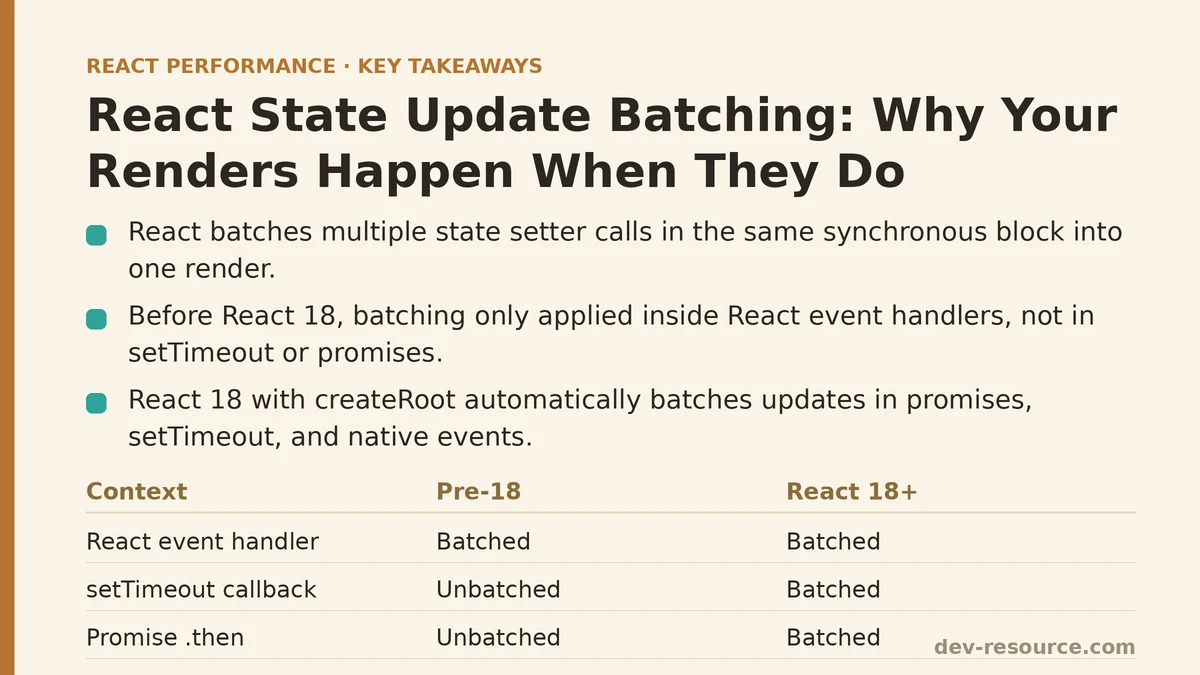
Run the handleClick function above inside a React event handler, and both setCount and setFlag get grouped into a single render. React doesn’t process them as two independent triggers; it queues both updates, computes the next state for each, and performs one reconciliation pass with both changes reflected. This is batching, and it’s not a special case — it’s the default behavior for updates originating from React-managed event handlers, going back to early versions of the library.
The confusion usually starts when the same pattern is moved outside of a React event handler — into a setTimeout callback, a native addEventListener, or a .then() on a promise. In versions of React prior to 18, batching did not apply in those contexts. Each setter call there triggered its own render, immediately:
function handleClick() {
  setTimeout(() => {
    setCount(c => c + 1); // render #1 (pre-React 18)
    setFlag(f => !f);     // render #2 (pre-React 18)
  }, 0);
}
That inconsistency — batched inside React’s own event system, unbatched everywhere else — was one of the more persistent gotchas in pre-18 React, and it’s the exact gap the next model needs to account for.
The Advanced Model: What Gets Grouped, and Where
The accurate model replaces “does this happen inside an event handler” with a more precise question: is this update happening inside a scope React is actively tracking as a batching context? Historically, that scope was limited to React’s synthetic event handlers. React 18 widened it considerably through a feature usually called automatic batching.
React 18 and Automatic Batching
With createRoot from react-dom/client, React 18 batches state updates regardless of where they originate — inside promises, setTimeout callbacks, native event listeners, and any other asynchronous context, not just inside React’s own synthetic events. The same setTimeout example from above now produces a single render under React 18’s automatic batching:
function handleClick() {
  setTimeout(() => {
    setCount(c => c + 1); // batched
    setFlag(f => !f);     // batched — one render total
  }, 0);
}
This is why upgrading a legacy ReactDOM.render app to createRoot can silently change render counts in places nobody touched. If code was relying on each setter call in a callback producing an immediate, separate render — for instance, reading a DOM measurement between two updates — that assumption stops holding once automatic batching is in effect.
The Escape Hatch: flushSync
Occasionally you need the old, unbatched behavior on purpose — usually because a subsequent line of code depends on the DOM having already reflected an intermediate state. flushSync, imported from react-dom, forces React to apply an update and flush it to the DOM synchronously before continuing:
import { flushSync } from 'react-dom';

function handleClick() {
  flushSync(() => {
    setCount(c => c + 1);
  });
  // DOM has been updated with the new count by this point
  setFlag(f => !f);
}
Reaching for flushSync regularly is usually a sign that a component is coupling render timing to logic that would be better handled with a useEffect or a ref-based measurement instead. It exists for the cases where that decoupling genuinely isn’t practical — measuring a freshly-rendered element’s height before triggering an animation is the most common legitimate use.
Beginner vs Advanced Model, Side by Side
| Question | Beginner Model | Advanced Model |
|---|---|---|
| Does one setter call = one render? | Assumed yes | No — depends on batching context |
Are updates in a setTimeout batched? |
Not considered | Yes, under React 18 automatic batching |
Are updates in a promise .then() batched? |
Not considered | Yes, under React 18 automatic batching |
| Were these contexts batched pre-React 18? | N/A | No — each caused its own render |
| Can batching be bypassed on purpose? | Not known | Yes, via flushSync |
| Root API in use | ReactDOM.render (legacy) |
createRoot (React 18+) |
Practical Debugging: Confirming What’s Actually Batching
When render counts don’t match expectations, checking two things resolves most cases. First, confirm which root API the app is using — createRoot versus the legacy ReactDOM.render — since this single detail determines whether automatic batching applies outside React’s own event handlers. Second, add a render counter directly inside the component body rather than inferring render count from side effects, since effects can run on a different schedule than the render itself:
function Counter() {
  const renderCount = useRef(0);
  renderCount.current += 1;
  console.log('Render #', renderCount.current);
  // ...
}
Watching that counter while triggering updates from different contexts — a button click, a setTimeout, a promise resolution — makes the batching boundary visible directly, rather than relying on assumptions about where it should or shouldn’t apply.
A Few Rules Worth Keeping Nearby
Updates inside React event handlers have been batched since early React versions and remain batched. Updates inside setTimeout, native event listeners, and promises are batched automatically starting with React 18’s createRoot, but not in the legacy root API. flushSync forces a synchronous, unbatched update when a specific line of code needs the DOM to already reflect a prior state change. And multiple setState calls referencing the same state value inside a single batch should generally use the updater-function form — setCount(c => c + 1) rather than setCount(count + 1) — so each update builds on the correctly queued prior value rather than a stale closure snapshot.
If you’re seeing more renders than expected in a specific component, the fastest way to make progress is usually not to reason about it in the abstract — it’s to add the render counter above, trigger the update from each code path involved, and read off exactly where the batching boundary sits in your specific case. Related guides: Common Mistakes When Optimizing React Forms for Performance, React Server Components: What They Actually Change for Performance, and How to Measure React Component Render Times with the Profiler API.
🔗 Recommended Reading
- React Performance Mistakes in Fintech Dashboards and How to Fix Them
- Lazy Loading Images and Components in React: A Step-by-Step Tutorial
- React Memoization: When and How to Use memo, useMemo, and useCallback
- Next.js App Router Performance Optimization for Beginners: A Step-by-Step Guide
- Measuring and Fixing React Re-render Performance: A Step-by-Step Walkthrough