Say you are trying to animate a slide-in navigation panel in a React app, and it looks fine on your development machine but drops to a stuttering mess the moment you test it on a mid-range Android phone. This is one of the more common performance complaints in React codebases, and it almost always comes down to one decision made early and never revisited: whether the animation should be driven by CSS or by JavaScript. This walkthrough follows one such panel from its original, janky implementation through to a fix, with the profiling data at each step to show why the fix worked.
The Starting Point: A Panel That Stutters
The component in question was a settings panel that slides in from the right edge of the screen when a user taps a menu icon. The original implementation used React state to track the panel’s horizontal position in pixels, updating that value on every animation frame with requestAnimationFrame, and applying it directly to an inline left style.
function SettingsPanel({ isOpen }) {
  const [position, setPosition] = useState(320);

  useEffect(() => {
    let frame;
    const target = isOpen ? 0 : 320;
    function step() {
      setPosition(prev => {
        const next = prev + (target - prev) * 0.2;
        if (Math.abs(next - target) < 1) return target;
        frame = requestAnimationFrame(step);
        return next;
      });
    }
    frame = requestAnimationFrame(step);
    return () => cancelAnimationFrame(frame);
  }, [isOpen]);

  return (
    <div className="settings-panel" style={{ left: `${position}px` }}>
      Panel content
    </div>
  );
}
Opening the Chrome DevTools Performance panel and recording a single open-and-close cycle told the story immediately. Each frame update triggered a full React re-render, a recalculation of left, and — because left is a layout property — a full layout recalculation (reflow) followed by a repaint, for every single frame of the animation. On the throttled “Low-end mobile” CPU setting, the recording showed dropped frames throughout the transition, with several frames taking over 40ms to produce — well past the 16.7ms budget needed to hit 60fps.
Why left Was the Wrong Property to Animate
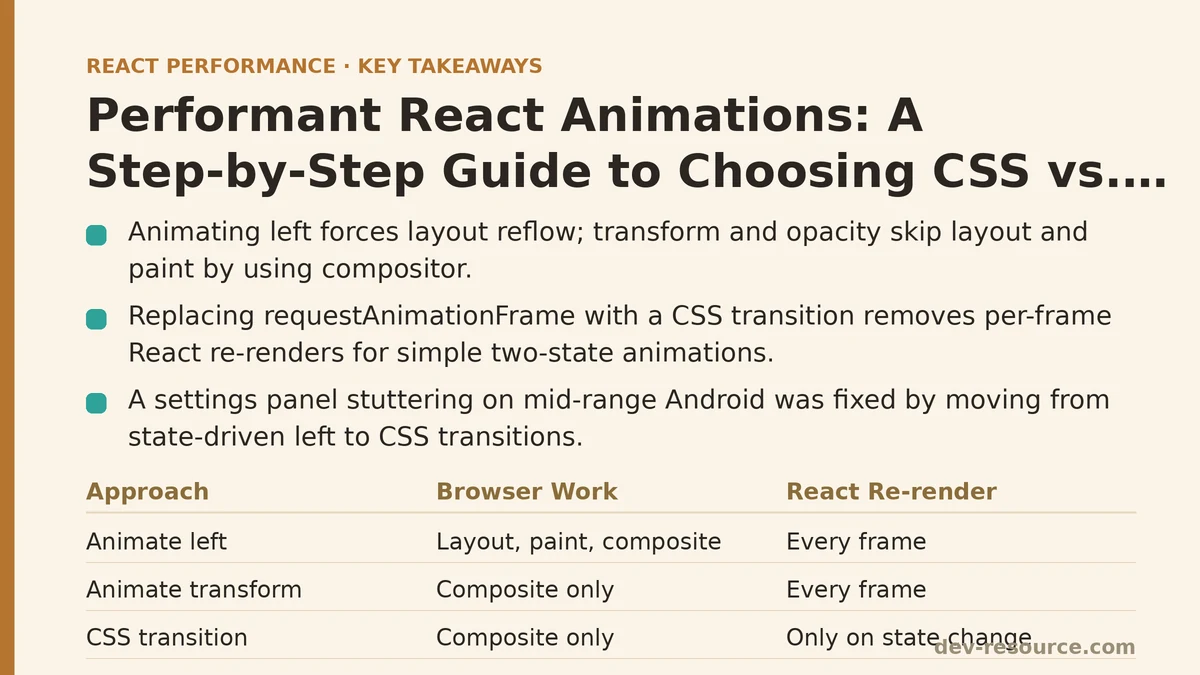
The root issue here isn’t React specifically — it’s which CSS property was being changed. Browsers handle layout, paint, and composite as three distinct, increasingly cheap stages of rendering work. Changing left, top, width, or height forces the browser back to the layout stage, because those properties can shift the position or size of surrounding elements too. The browser has no way to know that only this one panel needs to move, so it re-checks the whole layout tree.
transform and opacity, by contrast, can usually be handled entirely on the compositor thread. They don’t affect layout at all — an element translated with transform: translateX() still occupies its original space in the document flow as far as layout calculations are concerned — so the browser can skip layout and paint entirely and hand the work straight to the GPU.
The fix, then, didn’t require abandoning the requestAnimationFrame approach yet. As a first test, swapping left for transform alone was worth measuring in isolation:
<div
  className="settings-panel"
  style={{ transform: `translateX(${position}px)` }}
>
Re-recording the same interaction showed a real improvement — the Performance panel’s rendering timeline was noticeably thinner, with layout and paint work almost disappearing from the frame breakdown. But the recording still showed React committing a new render on every single frame of the animation, since position was still state living in a component. That’s a lot of unnecessary render work for an animation that doesn’t need React involved at all once it starts.
Replacing JavaScript-Driven State With a CSS Transition
This is the point where the case for CSS becomes concrete rather than theoretical. The panel’s animation is a simple two-state transition — open or closed — with no need for interruption mid-animation, no dependency on live data, and no requirement to synchronize with anything else happening in the render tree. That profile fits CSS transitions almost exactly.
The rewrite dropped the requestAnimationFrame loop and the pixel-tracking state entirely, replacing them with a CSS class toggle:
function SettingsPanel({ isOpen }) {
  return (
    <div className={`settings-panel ${isOpen ? "panel-open" : ""}`}>
      Panel content
    </div>
  );
}
.settings-panel {
  transform: translateX(320px);
  transition: transform 300ms ease-out;
}

.settings-panel.panel-open {
  transform: translateX(0);
}
React’s only job now is to add or remove a single class name — one render, not sixty. The browser’s compositor handles the rest of the transition without any further involvement from JavaScript at all. Recording this version in the Performance panel showed almost no scripting time during the animation itself; the timeline was dominated by a thin, consistent band of compositor activity, and the frame rate held at a steady 60fps even under the throttled CPU setting.
This is the general rule worth carrying forward: if an animation has a fixed start state and end state, and nothing needs to read or react to its in-between values from JavaScript, CSS transitions or CSS animations should be the default choice. They run off the main thread, they survive React re-renders elsewhere on the page without interruption, and they require no state management at all.
Where CSS Stops Being Enough
The settings panel was a clean case, but not every animation problem resolves this easily. A second component on the same page — a drag-to-reorder list — needed the same kind of profiling but landed on the opposite conclusion.
Dragging a list item requires reading the pointer position on every frame, updating the dragged item’s location to follow the cursor, and shifting the other items out of the way in response to a value that isn’t known ahead of time. There’s no fixed “end state” to declare in a CSS class; the destination depends entirely on where the user’s pointer happens to be when they release the mouse. That rules out a plain CSS transition, since CSS transitions animate between two known states, not toward a constantly moving target driven by user input.
This is where a JavaScript-based animation library earns its cost. The team here used Framer Motion’s useMotionValue and useDragControls to handle the drag interaction, letting the library manage frame-by-frame updates through its own optimized scheduler rather than routing every pointer move through setState:
function DraggableItem({ item }) {
  const y = useMotionValue(0);
  return (
    <Reorder.Item value={item} style={{ y }} dragListener>
      {item.label}
    </Reorder.Item>
  );
}
Profiling this version showed a different pattern than either of the earlier panel attempts: consistent scripting time during the drag itself, since a real value has to be computed on every pointer move, but no wasted React re-renders — Framer Motion updates the underlying DOM node’s transform directly, bypassing React’s render cycle for the parts of the update that don’t need it. That distinction, updating the DOM without going through a full component re-render, is what keeps JavaScript-driven animations viable for interactive cases even though they carry more inherent cost than a CSS transition.
The Decision Point, Stated Plainly
Both components in this walkthrough lived on the same page, and each ended up on a different side of the same decision. The settings panel had two known states and no runtime input — CSS won. The drag-to-reorder list had a destination that could only be known by reading live pointer data — that pushed the implementation toward JavaScript, and specifically toward a library built to update the DOM without funneling every frame through React state.
A rough version of the test applied throughout this case study:
- If the animation moves between two fixed, known states and doesn’t need to respond to continuous user input mid-animation, reach for a CSS transition or CSS animation first.
- If the animation must track a value that changes unpredictably at runtime — pointer position, scroll offset, gesture velocity — a JavaScript-driven approach is usually unavoidable, but the goal should be a library or technique that updates the DOM directly rather than routing every frame through
setState. - Regardless of which approach gets chosen, animate
transformandopacitywherever possible. Both stay off the layout and paint stages of the rendering pipeline in a way that properties likeleft,width, andmarginnever will. - Confirm the choice with the Performance panel rather than assuming it from the code. The settings panel’s
transform-onlyrequestAnimationFrameversion looked reasonable on paper but still cost a render per frame — a cost invisible until it showed up on the timeline.
What the Numbers Looked Like Across All Three Versions
| Version | Property Animated | Frames Dropped (throttled CPU) | React Renders During Animation |
|---|---|---|---|
Original (left + rAF) |
left |
Frequent, visible stutter | ~60 (one per frame) |
| Transform + rAF | transform |
Rare | ~60 (one per frame) |
| CSS transition | transform |
None observed | 1 |
| Drag list (Framer Motion) | transform (via motion value) |
None observed | 0 during drag |
The panel’s final version and the drag list’s final version look almost nothing alike in their code, and that’s the point worth sitting with. Performant animation in React isn’t one technique applied everywhere — it’s a per-case judgment about whether the animation’s destination is knowable in advance, made and then checked against real profiling data rather than assumed from how clean the code looks.
Next time an animation in your own app feels off, it’s worth asking the same question this case study started with: does this need to react to something the browser can’t predict in advance, or is it just moving between two states you already know? The answer tends to point straight at the right tool. Related guides: Profiling React Apps with the Chrome DevTools Performance Tab: A Step-by-Step Guide, React Hydration Performance: A Step-by-Step Guide to Diagnosing and Fixing Slow Hydration, and Reducing JavaScript Execution Time in React Apps: A Q&A Guide.
🔗 Recommended Reading
- React Performance Mistakes in Fintech Dashboards and How to Fix Them
- Lazy Loading Images and Components in React: A Step-by-Step Tutorial
- React Memoization: When and How to Use memo, useMemo, and useCallback
- Next.js App Router Performance Optimization for Beginners: A Step-by-Step Guide
- Measuring and Fixing React Re-render Performance: A Step-by-Step Walkthrough